
Follow ZDNET: Add us as a preferred source on Google.
ZDNET's key takeaways
- Roku TVs and devices can slow down when cache builds up.
- A hidden remote shortcut soft resets my Roku and clears cache.
- Clearing cache is a quick first step, as long as I remember to do it.
I have two Roku TVs, one 4K TV with a Roku streaming stick, and a Roku soundbar connected to several Roku speakers. I also have too many Roku streaming devices lying around in old tech drawers that I desperately need to declutter. Speaking of clearing out junk, it's time to clear the cache on my Roku devices again. Why? When I remember to do it, there's a huge performance improvement.
I clearly love Roku devices, but my biggest complaint is that they can get bogged down and start running slowly. Sometimes Netflix takes a few extra seconds to open. Or Disney+ hangs on its logo just long enough for me to wonder whether I should restart my TV. I understand there are worse things in life, but it is super annoying in the moment.
Also: Every Roku user should know these 15+ shortcuts
A while back, I saw ZDNET's guide on how to clear the cache on a Roku. I'd looked for this setting before, but noticed Roku doesn't have a “clear cache” button like Amazon Fire TV devices do. I learned that, on Roku, I have to use a remote shortcut to “soft reset” my device. That will clear out any temporary system clutter possibly causing things to slow down. So, I tried it, and wow.
Let's just say clearing the cache on my Roku is like giving the whole system a much-needed jolt.
Why does Roku even have cache?
Like a PC or phone, Roku devices store temporary data, called cache, to help apps load faster. So, when I open a streaming app, instead of redownloading elements like images, thumbnails, and logins, my Roku remembers that information, allowing the app to load quickly. Ironically, however, cache can build up, become cluttered and corrupted, and cause issues.
Also: I replaced my bedroom TV with this $170 Roku projector
When I'm experiencing sluggish performance like apps freezing, audio-video sync problems, or error messages, I know it's time to clear the cache. Unlike a browser on my PC or phone, though, I can't dig into settings to find a clear cache button. There is no screen where I can purge cache, clean up storage, or anything like that. Instead, I'm given the option to do a soft reset or restart.
The button sequence is weird, but it works
We all know how to restart a Roku, or should, anyway. I can unplug it from the wall to do a full power cycle, which is the best method because it allows any electrical charge in the capacitors to dissipate, fully clearing the cache, or I can go to Settings > System > System Restart > Restart with my remote. I can use either the Roku app's remote or my physical remote, which I've long lost.
Also: Lost your Roku remote? Here are four ways you can still control your TV
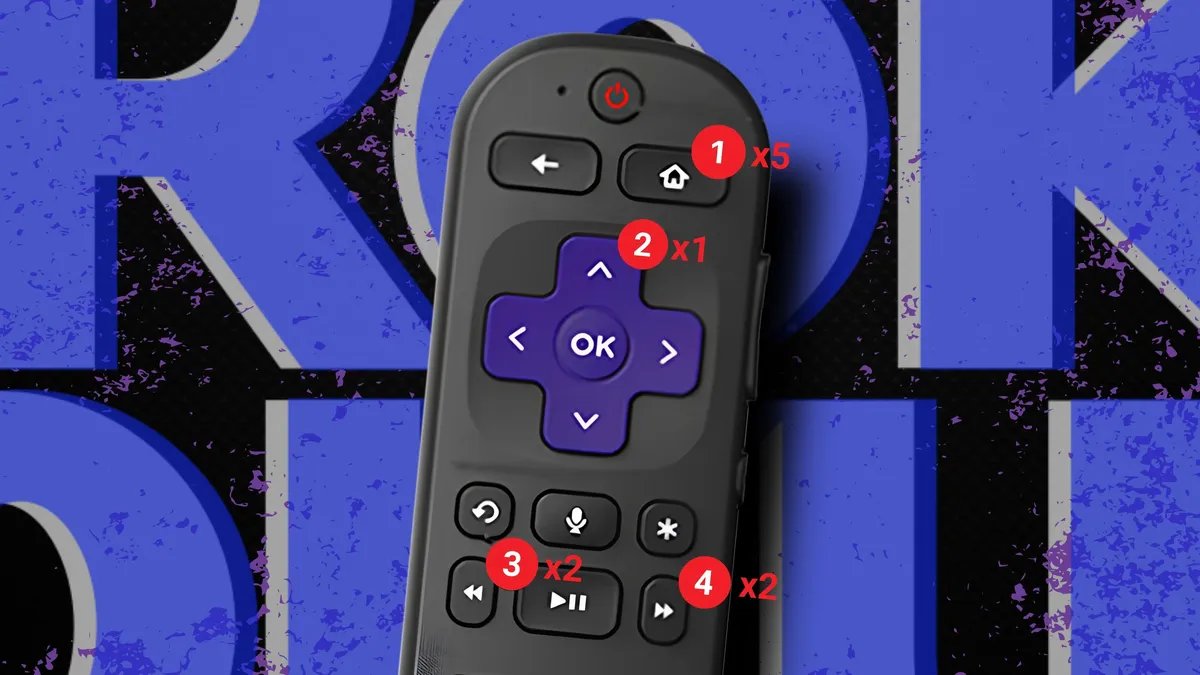
But there's another way I can use my remote to perform what's called a soft reset, and it involves pressing a weird button sequence:
- Home five times.
- Up once.
- Rewind twice.
- Fast Forward twice.
That's it. Unfortunately, whenever I do it, I don't see a confirmation screen or satisfying “cache cleared” notice. Instead, my Roku just freezes for a moment and then restarts. This is what clears out any troublesome cache, and I find my system immediately works much better after. Sluggishness? Gone. Crashes? No more. Everything feels good as new. Why in the world is this trick hidden?
Again, I don't need the physical Roku remote. I can just use the Roku mobile app's remote to enter the button sequence.
It won't fix everything
After performing a soft reset, apps that would hang on the splash screen or act all glitchy suddenly work great. They're faster and less sticky. All good, right? Not so fast. While clearing cache is a must, sometimes I need to do a few other cleanup tasks.
Also: Google TV or Roku: Which is actually worth your time?
If an app is still opening slowly afterward, it just means the issue wasn't temporary data. In those cases, I'll remove and reinstall the app, which forces a fresh download and usually fixes any remaining issues. Roku devices also have limited storage and memory, so if I see unused apps piling up on my home screen, I need to go through and delete any I haven't used in months.
Still, clearing cache is a good first step because it's quick, free, and takes only a minute to do.
Remembering to clear my cache
Creating habits is difficult for many people, myself included. I don't need to clear my Roku cache every day. Constantly restarting my device would be more tedious than helpful. But I should do it once a month instead of waiting for my Roku to start noticeably acting up. So, I've set up a reminder on my iPhone. I have it go off in the evening, when I'm most likely to be watching TV.
Otherwise, if I'm working during the day and get notified to do it, I'll ignore it, and I'll never get it done. But also, if I'm watching something and get the reminder, I won't want to reset my Roku right then, so I'll swipe away the alert and forget until next month.
That brings me to now.
Also: How to use MacOS Reminders (and why you should)
I've been ignoring my reminders and really need to clear the cache across all my Roku devices. It's a low-risk fix that solves my biggest complaint: that slow, sticky, sluggish feeling that builds up with Rokus over time. It makes my apps more responsive and resolves most glitches. So, if your Roku is lagging, freezing, or taking too long to open apps, give it a try.
And set a reminder to do it every so often. Just don't be like me and ignore it for too long.