
Follow ZDNET: Add us as a preferred source on Google.
ZDNET key takeaways
- Pop!_OS 24.04 has finally launched.
- COSMIC Desktop is now out of beta and ready for the masses.
- Pop!_OS 24.04 is fast, reliable, beautiful, and free.
I've been using Pop!_OS as my default desktop operating system for about a decade now, and I've had very few complaints. Sure, at times, the app store was buggy, so I just used the command line. Of course, the desktop wasn't quite as flexible and configurable as I typically like, but there are always extensions.
As with any Linux distribution, where there's a will, there is most certainly a way. However, with the release of Pop!_OS 24.04 comes something very special: COSMIC.
Also: 5 of my favorite Linux distros ready to use out of the box – no setup required
I've already covered COSMIC desktop and proclaimed it “out of this world.” That earlier coverage was during the alpha and beta phases of the desktop's development. We finally have the first stable release by way of Pop!_OS 24.04, and it's a work of art.
Imagine taking the GNOME desktop, rewriting it using a faster programming language, and making it customizable on the level of KDE Plasma. That's what COSMIC desktop is.
The first thing that hit me with the first stable release of COSMIC desktop was its speed. Other than a handful of lightweight desktop environments, COSMIC is, hands down, the fastest DE that I've ever used. That's not an exaggeration.
Configurable beauty
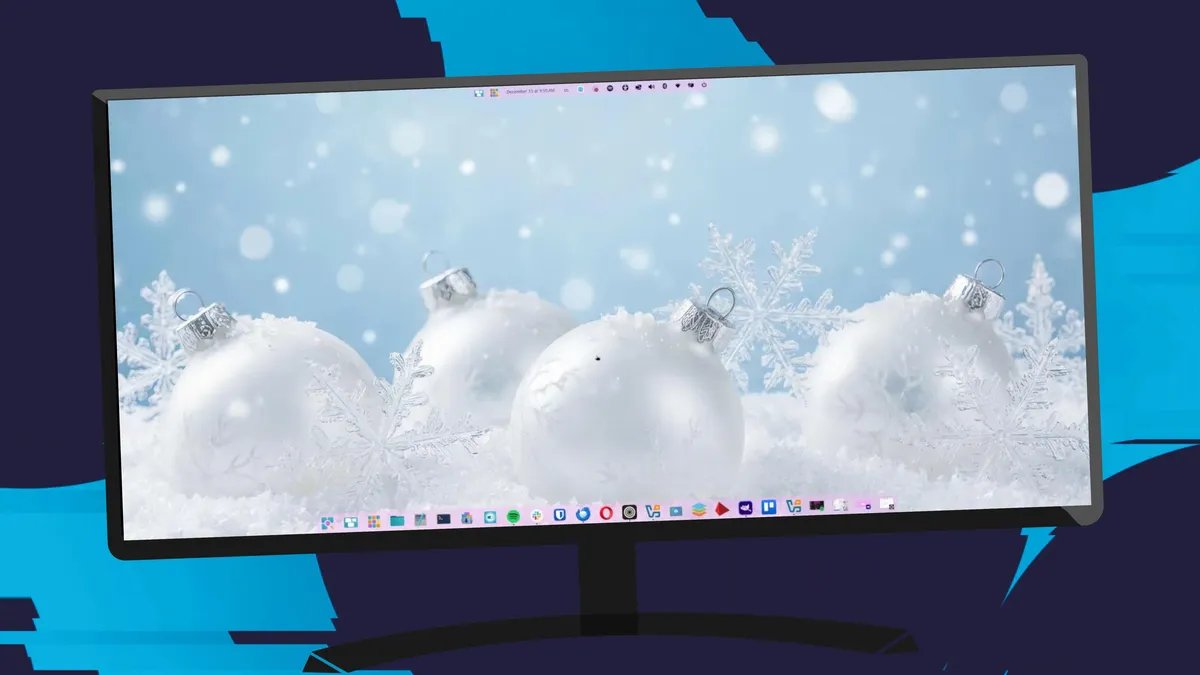
On top of that, COSMIC is beautiful. In less than a minute, I had the desktop configured to look like something pretty special. From within Settings > Desktop, you can configure accent colors, themes, panels, docks, window management, and workspaces. If you'd rather have a dock (instead of a pane) at the bottom of your display, click Dock and then enable the feature.
Customizing COSMIC desktop is super simple.
Jack Wallen/ZDNET
One really cool aesthetic configuration you can make is setting the window and container background colors. Seeing as how I place an unreasonably high priority on the look of my desktop, this feature has become a must for me, and COSMIC nails it.
The need for speed
Of course, the appearance of the desktop isn't nearly as important to most, so what else do COSMIC and Pop!_OS 24.04 have to offer? As I mentioned earlier… speed.
Also: 5 reasons why Linux will overtake Windows and MacOS on the desktop – eventually
Of all the operating systems I've used over the years, Pop!_OS 24.04 with COSMIC is the fastest. Apps open instantly (even larger apps like LibreOffice and Zen Browser), and even with several larger apps open, the system has never once bogged down.
Some of the reasons Pop!_OS 24.04 is so fast include the following:
- Linux Kernel 6.17, which enhances performance and responsiveness.
- The COSMIC desktop environment is designed to be lightweight and efficient.
- COSMIC applications (such as Files, Store, and Terminal) are built using the Rust programming language, which is known for its memory safety and performance.
- Pop!_OS uses a new hybrid graphics feature that allows applications to automatically run on the appropriate GPU.
- Pop!_OS 24.04 LTS supports a wider range of modern hardware.
- The System76 schedule is well-known for its speed and handling of resources.
One thing of note is that the hybrid graphics feature makes gaming about as good as it gets on Linux.
All of those come together to make a screaming-fast desktop operating system.
It's rock solid but…
I've been using COSMIC desktop since the alpha phase of development, and even back then, it was reliable. Now, it's as rock solid as any desktop I've used. Every application runs without issue, and the desktop is as smooth and seamless as they come.
Also: I rediscovered my longtime Linux favorite – thanks to a spin I didn't see coming
There are, of course, a few tiny caveats (not all of which are COSMIC's fault). First of all, when I go to close a VirtualBox VM, the close pop-up appears as nothing more than a tiny title bar, which I always have to expand so it can be used.
This little glitch can be really annoying.
Jack Wallen/ZDNET
Another issue has been sound. First off, getting Bluetooth headphones or earbuds to connect can be a bit of a challenge. On top of that, every time I log out or reboot, Pop!_OS doesn't remember the last used sound output device, which means I always have to manually select it.
Then there's an issue with GIMP and screenshots. I've tested this to make sure it wasn't just a GIMP issue, and it's not. When I go to take a screenshot in GIMP, I'm greeted with a pop-up that allows me to select if I want to grab the entire screen, a single window, or an area. I also get the choice of delaying the screenshot.
Also: Ubuntu Budgie vs. Pop!_OS: I've used both Linux distros – here's how to choose
On COSMIC, that does not happen. I click File > Create > Screenshot, and there's no pop-up; the screenshot is taken, and I then have to edit out what I don't want. That's not the biggest issue with GIMP screenshots. Because of its current state on COSMIC, I can't delay the screenshots, which means it can be problematic getting certain images.
Hopefully, those issues can be resolved soon, so I don't have to take the extra steps.
Other than those tiny caveats, Pop!_OS 24.04 with COSMIC has been a dream. If you're looking for a rock-solid, fast, and beautiful operating system, board the System76 rocket and fly straight to the Pop!_OS download area, grab an ISO, and install away.